July 10th, 2014Just like Gmail Notifier is multi-language, now Gmail extends its multi-language capabilities with 13 new languages.
These 13 new languages are joining the Gmail family: Afrikaans, Armenian, Azerbaijani (Azeri), Chinese (Hong Kong), French (Canada), Galician, Georgian, Khmer, Lao, Mongolian, Nepali, Sinhala, and Zulu.
As any native speaker knows, each language has its own nuances, so we worked closely with linguists to make sure the tone and style are just right. For example, both Hong Kong and Taiwan use traditional Chinese characters. However, you’ll notice that Gmail’s new Chinese (Hong Kong) language uses 收件箱 for “Inbox” instead of 收件匣, which is a word more common in Taiwan.
Posted in Technology | Comments Off
April 7th, 2011Version 1.0.0.87 was released on 07/04/2011 and it includes the following changes:
— Fixed bug: emails page showing blank page (this bug appeared after installation of IE9 and\or Win7 SP1)
- Added: connection reset every 30 minutes to ensure connectivity
- Enhanced: IMAP commands for delete and mark read are now executed on a different thread, allowing the UI to update instantly, without locking the main thread
Gmail Notifier Download
Posted in Gmail Notifier | Comments Off
January 15th, 2011In case you experienced a situation where you sent an email to yourself (appears as ‘me’), and found that Gmail Notifier failed to notify for it, you should know that there is a technical limitation to the Gmail IMAP service. According to Wikipedia:
“By design, Gmail does not deliver all of a user’s e-mails. When downloading mail through POP or IMAP access, Gmail fails to deliver messages that users have sent to themselves if the client has a copy of it already.”
Posted in Gmail Notifier | Comments Off
November 28th, 2010Version 1.0.0.86 was released on 27/11/2010 and it includes the following changes:
— Fixed critical bug: connection loss without recovering it
- Fixed bug: removing email body from cache after delete or mark read
- Removed: email address validation when adding account
Gmail Notifier Download
Posted in Gmail Notifier | Comments Off
November 21st, 2010Version 1.0.0.85 was released on 19/11/2010 and it includes the following changes:
— Support for long email addresses
- Can run even if the website is down
- Fold \ unfold from the tray icon
- Better handling of sleep and wake up
- Better synchronization between the polling thread and the application
Gmail Notifier Download
Posted in Gmail Notifier | Comments Off
November 14th, 2010here it is …
Posted in Heat of The Moment | Comments Off
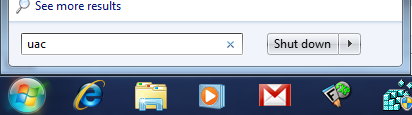
November 12th, 20101. Run UAC
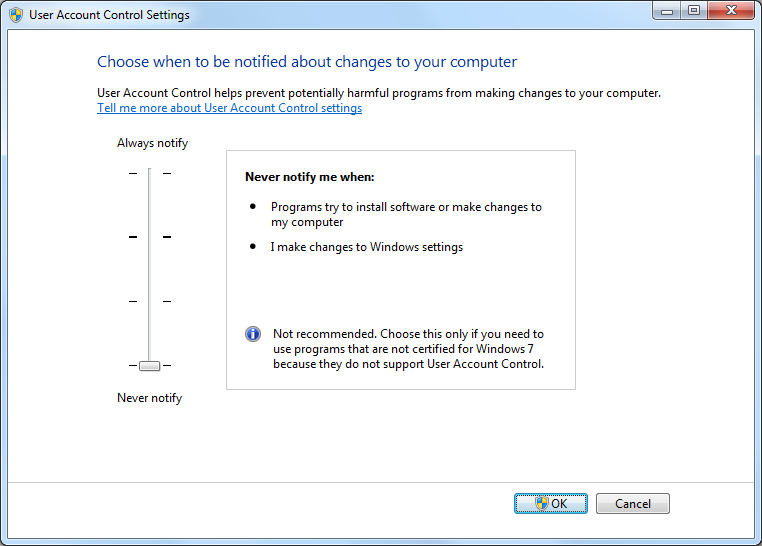
2. Disable UAC
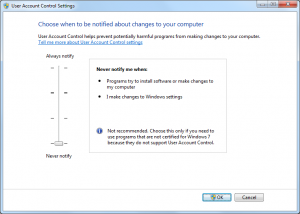
Now, open Gmail Notifier preferences,
and select the ‘Use Gmail for mailto links’.
Once done, you can revert the UAC back to its original status.
Posted in Gmail Notifier | Comments Off
November 12th, 2010Posted in YouTube | Comments Off
November 12th, 2010Posted in YouTube | Comments Off
November 12th, 2010Gmail Notifier is using IMAP to communicate with Gmail, but I obviously didn’t write an implementation of the IMAP protocol but rather used for something that is ready to work with.
So like about any subject that I wish to dig into, I went to Google to search for an IMAP library. Since the software is written in C++ \ MFC, I had to find a lib that will fit.
So eventually I selected to work with Chilkat software. Although it isn’t an open source project and is a commercial package, it was good because it gave me all I needed and not just the IMAP, but also a solution for encryption and decryption of the user name and password. It also has tons of sample code which was almost good for copy paste. A great over all library but it lacks one important thing, the ability to fetch email body, leaving the attachment (if any) on the server. But it does have the option to send raw IMAP commands so it leaves an open door for that.
Posted in Gmail Notifier | Comments Off